
Remote Access (Remote Work)
- This feature is designed for users with special needs and only supports custom nodes.
Common Remote Access Network Structure
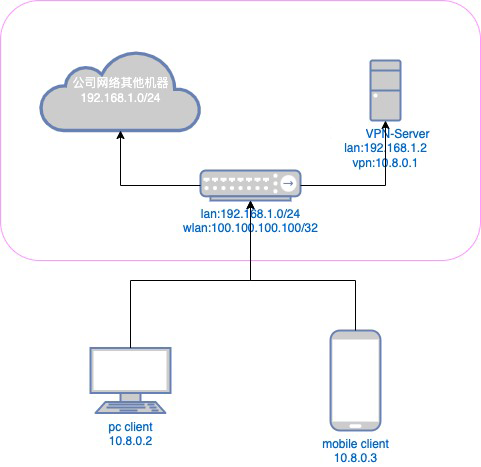
Network Structure Description
- The rounded box represents the office network
- The office network's public IP address is 100.100.100.100, and the internal IP address range is 192.168.1.0/24.
- Install Ponyvpn_server on one of the machines in the office network at 192.168.1.2. Then, configure NAT forwarding on the office network router to forward traffic from the public VPN service port to port 443 (customizable) on 192.168.1.2.
- Configure the VPN on Ponyvpn_server The network segment is 10.8.0.0/16, the local virtual network interface card's IP address is 10.8.0.1, and the client route is set to 192.168.1.0/24.
- The client can connect to the Ponyvpn server through the client software at 100.100.100.100: (VPN service port).
- The client receives the IP addresses 10.8.0.2 and 10.8.0.3 assigned by the Ponyvpn server (refer to the internal network IP address marked in the client software).
- After the client connects to the Ponyvpn server, the local 192.168.1.0/24 network segment is automatically routed through the VPN tunnel to the Ponyvpn server in the office. Pinging any machine on the 192.168.1.0/24 network segment from the client will work.