
Bridge Network
- This feature is designed for users with special needs and only supports custom nodes.
Common Bridge Network Configurations
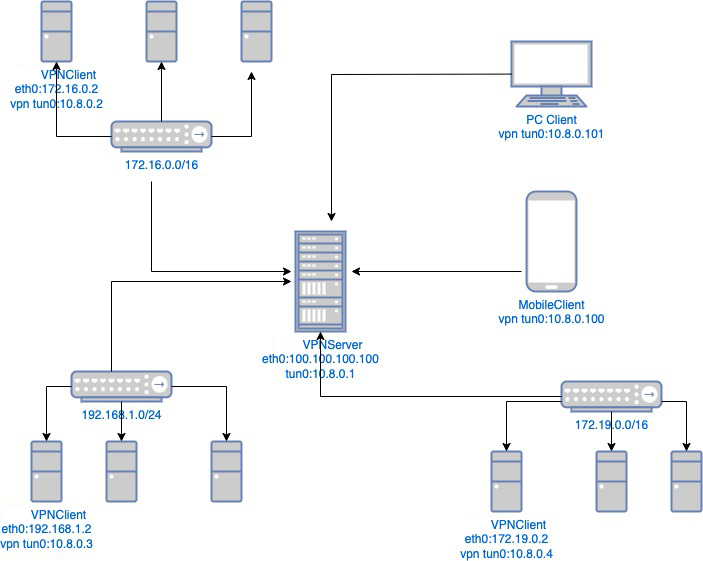
Network Configuration Description
- The requirement is to enable interconnection between the networks in these three different locations, allowing employees in these three offices to remotely access the company's internal network resources via VPN.
- First, we need to deploy a Ponyvpn_server with the public IP address 100.100.100.100. This server can be deployed in any of the three locations or in one of the offices. A fixed IP address is preferred.
- Ponyvpn_server establishes a VPN network with the address 10.8.0.0/16, creates a virtual network interface (tun0), assigns the IP address 10.8.0.1, and listens on port 443.
- Then, you need to install the PonyVPN Client on three machines in these three networks: 172.16.0.2, 192.168.1.2, and 172.19.0.2.
- Configure the PonyVPN server for these three clients to be fixed at 10.8.0.2, 10.8.0.3, and 10.8.0.4, respectively, and then configure the server routing.
- Configure the client routing on the client side.
- Configure routing on the routers of the three networks. This will allow the three networks to communicate with each other. Remote employees can easily access all three networks by connecting to the PonyVPN server.
How can other machines on the local network access other remote network segments through the 172.16.0.2 machine?
- Method 1: Add two routing rules to the 172.16.0.2 machine from another machine.
∘ ip route add 172.19.0.0/16 via 172.16.0.2 This means that traffic to the 172.19.0.0/16 network segment is forwarded to 172.16.0.2.
∘ ip route add 192.168.1.0/24 via 172.16.0.2 means that traffic to the 192.168.1.0/24 network segment is forwarded to 172.16.0.2.
The above method requires adding these two routes to each local machine, which is quite cumbersome.
- Method 2: Add these two routing rules to the router on the local network.
Bridging Technology
1. The server's virtual network interface card (VLAN) and the client's virtual network interface card (VLAN) form a virtual private network (VPN).
2. The PonyVPN server acts as a router, implementing bridging functionality by specifying routing rules in the configuration file.